Presentation given to the Iowa Association of School Boards Fiscal Management Workshop. Parts of the presentation used with permission from Evelyn McCormack.
Links:
Waukee School District Considers Social Media Policy
Cedar Rapids CSD Board Reviews Social Media Policy
Illinois Association of School Boards Journal - Social Media can Offer a Different Conversation
Ohio School Board Association - Leaping into Social Media
National School Board Association - Tagged Articles on Social Media
Edutopia - How to Create Social Media Guidelines at Your School
School Communications 2.0
Evelyn McCormack - Valuable Social Media Resources

Wednesday, July 18, 2012


Tuesday, June 19, 2012
Blended Learning in Your Classroom
Presented to TICL (Northwest AEA and Prairie Lakes AEA) conference, 6/19.
Links of note in the presentation:
• Resource Iowa (Statewide Moodle Site)
• Moodle Resources
• Curriki
• Connexions
• Merlot
• CK-12
• Hippocampus
• MovieClips
• Udemy
• Khan Academy
• Diigo
• Geogebra
• Edmodo
• Google Docs
• ITSI-SU
• Youtube video of Aaron Sams
• OLLIE courses
Links of note in the presentation:
• Resource Iowa (Statewide Moodle Site)
• Moodle Resources
• Curriki
• Connexions
• Merlot
• CK-12
• Hippocampus
• MovieClips
• Udemy
• Khan Academy
• Diigo
• Geogebra
• Edmodo
• Google Docs
• ITSI-SU
• Youtube video of Aaron Sams
• OLLIE courses
Tuesday, October 18, 2011
AEA PD Online - October Update

This summer, we offered 72 online courses (with 1109 participants). That has been with limited number of instructors, as we are currently in a recruiting effort for more instructors to meet demands (those interested can start at our instructor toolbox or contact me). We should be at about 50 courses offered this fall. Our goal for 2012 is to offer 300 online courses.
Our online training system underwent many changes this summer as well. We added several Medication Administration trainings in specific areas:
- Administering Rectal Diazepam for Seizures
- Nebulizer Treatments at School
- Administering Glucagon to Students with Diabetes
- Medication Administration by Gastrostomy Tube
- Insulin Pumps
- Giving Insulin Injections
With these changes, and the recent $20 million cuts to AEAs, the AEA Chief Administrators have determined AEA PD Online will need to be self-sufficient. To assure self-sufficiency, there is a new funding structure in place for the online trainings. Individual participants now need to pay a $25 fee to complete the Mandatory Reporter training, a condition of licensure in Iowa. Also, districts have a 50 cent per enrolled K-12 student fee for unlimited access to all the other trainings on the system. Money raised from these ventures will help our instructional design support. Our plans are to add 5-10 new trainings this year with our instructional design support, for no additional fee to districts.
AEA PD Online's operational council approved the following goals for 2011-12:
- Expand and diversify our current offerings
- Implement quality assurance procedures
- Determine and foster relationship to other groups and initiatives in Iowa
- Continue implementing systemic plan of marketing and communication
- Assure funding self-sufficiency
More to follow, including the implementation of a mentoring program and a study of online communities in the state of Iowa.
Sunday, October 16, 2011
Metamorphosis of OLLIE 2
I am currently taking a post-midnight break from grading students in my OLLIE course "Technology for Online Instruction" (hoping to have that all finished still tonight). As I think about the two ITEC presentations that I still have not begun (giving those in 36 hours), a thought has come to me. It is interesting to take a look at how this course has changed over time.
The Technology for Online Instruction course introduces students to online tools, with a primary focus on Moodle. Participants each have a "practice course" where they have to create on their own the basic attributes of Moodle (a forum, a webpage, a lesson, a quiz, etc.)
Despite being the second course in the OLLIE sequence, I developed it first, withing the first few months I began to work for Heartland AEA (fall of 2008). I didn't know what I was doing at the time... not that I'm much better than that now. But at least I've tried a variety of things to improve the course over time. Indeed, the current iteration is the 9th different time I've offered the course since then, and each time takes on a bit of a change.

Well, it served the purpose. We had a course up and running, my first one ever in Moodle, and with live students to work with, I figured out pretty quickly we needed to make some changes.
ATTEMPT #2:
While the next time I offered the course I still was focused on simply learning Moodle, I made several changes to the content.
• Concise Was Better. I had way too many resources, resulting in the scroll of death, as you can see. I took large numbers of Moodle Webpages I had created and wove them together into a single Moodle Lesson. The result was a leaner look that was less panic-inducing for students and made their work more direct.

• Simplify My Assignments. Not only did I have too many resources, I had too many assignments. Actually, I had way too many forums; I had 11 in the first go-round. All students were doing was creating forum posts to topics, and not all the questions had a lot of bearing on their understanding of Moodle. I eliminated half the forums right off the bat.
• Eliminated Downloads. My first try featured a few Word documents and several PDFs. Which, required the user to have to download and view those outside of the browser. I never ran into the hypothetical student who did not have MS Word, so I was lucky. But transferring those into Moodle webpages and lessons made the content all self-contained in the course.
My 3rd attempt was primarily aimed at incorporating another tool, Adobe Connect Pro, into the course. We were actively pushing that as an AEA. However, while I was able to work it in to the curriculum, it always felt like a poor fit, and I ended up minimizing it after the 4th attempt.
ATTEMPT #4
My 4th attempt featured quite a bit of change, as I was now getting better at the concept of instructional design. I was now teaching 3 other courses online, so I was picking up several tips that I hadn't realized before.
• Embedded Video. I removed almost all of my uploaded video from the course. Instead, I embedded the video, either from YouTube or AEA's Eduvision. This has saved tremendously on bandwidth and the speed by which participants can access the videos.
• FAQ Database. I had made archived backups of all the previous courses before resetting them. This was a wise move, as I still had access to all the past Question & Troubleshooting forum questions that students had posed. I took all of the questions as well as the answers I provided and I put them into an FAQ database. The number of student questions in course #4 went down by 90%. And while I don't have as many questions, I still add them after every new course.
• Multiple Learning Paths. The biggest change to the course was out of necessity. I had several individuals struggle with learning Moodle, becoming overwhelmed by the added item of building their own content. For this course, I add the "template course" option. Specifically, I created my own template course - Basketball 101. I also recorded myself making each of the steps. For those participants who needed a more guided approach to learning Moodle, they could now re-create the template course, basically copying and pasting all the text (and using all the same images). In this way, they wouldn't have to take up time developing their own text. They could also follow my recordings step-by-step. And, they had a finished model to work with, to compare to their own product. This was a giant game-changer to the course, and all of the future courses I have developed have used a similar "multiple learning paths" model.
• Soft Chalk. I finally had had enough of Moodle's lesson module, as it looked boring and was clunky to navigate. I had access to Soft Chalk's "Lesson Builder" program, which is now known simply as Soft Chalk. Taking the lessons that I had created in Moodle, as well as a few brand new lessons (like how to embed Google Forms into Moodle), I created a Soft Chalk lesson for them and replaced the old one. Some might consider this a minor detail (it is just window dressing, right?). And yet, when individuals were creating their own practice courses, they wanted to know how I had made the lessons with the neat banners and built-in navigational items. And especially the hands-on interactives that Soft Chalk allows you to embed within it. Being SCORM-compliant, adding Soft Chalk was extremely easy to do, and greatly enhanced the visual professionalism of the course.

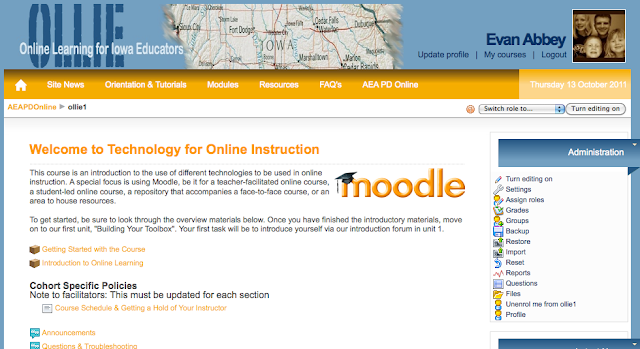

The Technology for Online Instruction course introduces students to online tools, with a primary focus on Moodle. Participants each have a "practice course" where they have to create on their own the basic attributes of Moodle (a forum, a webpage, a lesson, a quiz, etc.)
Despite being the second course in the OLLIE sequence, I developed it first, withing the first few months I began to work for Heartland AEA (fall of 2008). I didn't know what I was doing at the time... not that I'm much better than that now. But at least I've tried a variety of things to improve the course over time. Indeed, the current iteration is the 9th different time I've offered the course since then, and each time takes on a bit of a change.
THE BEGINNING:
When I first set out, the main purpose was to learn Moodle. Actually, that was the sole purpose. I was in a hurry to get a course out to meet the growing demand, so I grabbed a bunch of free misfit resources off the web and threw it together. The result:
Well, it served the purpose. We had a course up and running, my first one ever in Moodle, and with live students to work with, I figured out pretty quickly we needed to make some changes.
ATTEMPT #2:
While the next time I offered the course I still was focused on simply learning Moodle, I made several changes to the content.
• Concise Was Better. I had way too many resources, resulting in the scroll of death, as you can see. I took large numbers of Moodle Webpages I had created and wove them together into a single Moodle Lesson. The result was a leaner look that was less panic-inducing for students and made their work more direct.

• Eliminated Downloads. My first try featured a few Word documents and several PDFs. Which, required the user to have to download and view those outside of the browser. I never ran into the hypothetical student who did not have MS Word, so I was lucky. But transferring those into Moodle webpages and lessons made the content all self-contained in the course.
My 3rd attempt was primarily aimed at incorporating another tool, Adobe Connect Pro, into the course. We were actively pushing that as an AEA. However, while I was able to work it in to the curriculum, it always felt like a poor fit, and I ended up minimizing it after the 4th attempt.
ATTEMPT #4
My 4th attempt featured quite a bit of change, as I was now getting better at the concept of instructional design. I was now teaching 3 other courses online, so I was picking up several tips that I hadn't realized before.
• Embedded Video. I removed almost all of my uploaded video from the course. Instead, I embedded the video, either from YouTube or AEA's Eduvision. This has saved tremendously on bandwidth and the speed by which participants can access the videos.
• FAQ Database. I had made archived backups of all the previous courses before resetting them. This was a wise move, as I still had access to all the past Question & Troubleshooting forum questions that students had posed. I took all of the questions as well as the answers I provided and I put them into an FAQ database. The number of student questions in course #4 went down by 90%. And while I don't have as many questions, I still add them after every new course.
• Multiple Learning Paths. The biggest change to the course was out of necessity. I had several individuals struggle with learning Moodle, becoming overwhelmed by the added item of building their own content. For this course, I add the "template course" option. Specifically, I created my own template course - Basketball 101. I also recorded myself making each of the steps. For those participants who needed a more guided approach to learning Moodle, they could now re-create the template course, basically copying and pasting all the text (and using all the same images). In this way, they wouldn't have to take up time developing their own text. They could also follow my recordings step-by-step. And, they had a finished model to work with, to compare to their own product. This was a giant game-changer to the course, and all of the future courses I have developed have used a similar "multiple learning paths" model.
• Soft Chalk. I finally had had enough of Moodle's lesson module, as it looked boring and was clunky to navigate. I had access to Soft Chalk's "Lesson Builder" program, which is now known simply as Soft Chalk. Taking the lessons that I had created in Moodle, as well as a few brand new lessons (like how to embed Google Forms into Moodle), I created a Soft Chalk lesson for them and replaced the old one. Some might consider this a minor detail (it is just window dressing, right?). And yet, when individuals were creating their own practice courses, they wanted to know how I had made the lessons with the neat banners and built-in navigational items. And especially the hands-on interactives that Soft Chalk allows you to embed within it. Being SCORM-compliant, adding Soft Chalk was extremely easy to do, and greatly enhanced the visual professionalism of the course.

GENESIS OF OLLIE
It was at this time, the spring of 2010, that we began to conceptualize a new way of providing professional development for online teaching. We were putting down the foundation for AEA PD Online, and were looking for instructors. In addition, the Iowa EdTech ARRA grant started, and we had 20 schools across Iowa sign-up to have their teachers trained. We branded a more comprehensive initiative as OLLIE (Online Learning for Iowa Educators), a sequence of 5 courses (to be built over the next year), and built off the Iowa Online Teaching Standards. This meant several changes for our course.
It was at this time, the spring of 2010, that we began to conceptualize a new way of providing professional development for online teaching. We were putting down the foundation for AEA PD Online, and were looking for instructors. In addition, the Iowa EdTech ARRA grant started, and we had 20 schools across Iowa sign-up to have their teachers trained. We branded a more comprehensive initiative as OLLIE (Online Learning for Iowa Educators), a sequence of 5 courses (to be built over the next year), and built off the Iowa Online Teaching Standards. This meant several changes for our course.
• Re-branding. This is similar to what many other virtual schools have gone through, where a course that was locally developed and used by a teacher was now being assimilated into something bigger. We customized our own template on our new statewide Moodle server, using the Aardvark theme.

• Adding Images. This didn't happen solely in this step, but by this time, it was very noticeable. There were now images to break up long sections of text, as well as visual elements like horizontal rules.
• Change in Focus. Since this course was now part of an online pedagogy sequence, the focus was placed on understanding the concept of online technology as a whole. Some items of Moodle were moved to the enrichment section in order for participants to explore the other online tools that can be utilized within the framework. For the first time, participants now examined a brief summary of the different categories of tools that are available for online instructors, and then chose on their own an independent proposal to examine one tool. This, they then incorporated into their work.
• Groups & Groupings. This was also the beginning of the gargantuan sections of OLLIE, which we've called the Cohorts. Cohort 1 had 93 participants in it (we are currently on Cohort 5, which has 86 participants). These large groups were due primarily to the demand and the lack of supply... I was the only teacher at this point. Having 93 classmates will kill a participant, so I reconceptualized the course using groups of 15-20 people to make up a "class". I then made the activities in the course accessible by group, so that they would only see their fellow classmates. For me, since the course already used a small group assignment, this required some personal learning... I had to figure out groupings during the middle of the course, as I inadvertently set up the course wrong. Luckily, I won't make that mistake again.
REVISIONS OVER THE LAST YEAR
The course continues to evolve, despite that familiarity that sinks in when you have taught it repeatedly. I gave up the other courses that I had taught online, and only teach the 5 OLLIE courses, so that helps a bit in focus.
• Diigo. When I began to develop the other OLLIE courses, I was set on doing a mixture of group work activities. Forums were great to a point, but they weren't always the form of interaction that I wanted. While I had used Diigo for years and had even referenced it in the course as a tool online instructors could use, it took me quite a few iterations before I finally took my own advice. I changed our "Online Teaching Standards" forum into an "Online Teaching Standards" Diigo collaboration, which had the added benefit of familiarizing participants with another form of technology. This hasn't always been smooth, even when I had participants do their collaboration only in a Diigo group we formed. When the next section of the course came to the same website, they weren't greeted with a blank slate to Diigo-annotate (and after one class of 93 participants, there isn't much to annotate anymore). I had to seek out permission from the authors to make a copy of their articles to use in the course, and then make a fresh new copy with each new section of the course that I teach.
• Adobe Captivate. My recorded screencasts of me building different Moodle features had served their purpose, but it was time for a better tutorial. I re-recorded them, this time with Adobe Captivate. This allowed me to pause in between steps and annotate with words and arrows to show what I was talking about.

LOOKING TO THE FUTURE
Right now, we are still in the middle of changes. This past summer, we began to have different instructors teach the course. This has brought on a whole new set of challenges, which I'm probably a few iterations away from mastering. For one, the course still references a lot of outside resources. Those links go bad or those video clips suddenly disable embedding. And whereas before I only needed to keep track of my own course, now I need to make changes in many courses.
We are looking at Moodle's built-in repository feature. This essentially allows you to keep one copy of the resource on the server, and then each section of the course links to the central repository instead of its own file structure. Looks promising, yet we still have lots of work to do to get it to work.
That's not the only new feature that's out there. We are looking to integrate Google Apps into the Moodle platform, so that when a person signs in, their Google Apps (mail, calendar, docs) all appear within the course. This will allow for streamless use by our instructors over time. But this requires curriculum changes, assessment changes in the course, and new tutorials/resources. Similarly, we have added a audio recording tool that is embedded within the Moodle platform, which will be nice once we have it utilized.
The content itself is ever-changing as well. Podcasting was a big deal when I created this course. Now no one selects it as their independent proposal. Nings have gone away, as have dozens of other tools. Keeping the links active and the content fresh is a non-stop job.
The point here being, it is a misconception to think once you have built a course, it will never change. If it doesn't change, it isn't a course that I'd like to take. As an instructor, you have to have this in mind when you make the choice to teach online.
Wednesday, September 21, 2011
No Imagineering Allowed

But today is different. I'm blogging with a bit of anger. Never a good thing.
My oldest daughter entered 6th grade this year, meaning middle school. She is taking on a lot, including Pre-Algebra, Confirmation, and her first job (teaching Tae Kwon Do for Park and Rec). Her busyness has caused a lot of stress for her, which usually results in some deep discussions and a few tears.
So imagine my frustration when the latest issue was because a teacher wouldn't let her be an imagineer.
Okay, background info. Imagineer = the artistic brains behind designing Disney World attractions and rides. And the assignment = your run-of-the-mill "pick an occupation that you want to be and copy down facts about it... er, research it".
This assignment of course will be done a dozen times by a student in their school career, probably starting in kindergarten. Perhaps more, now that we are paying lip service to "employability skills" usually without any comprehensive curricula on fostering them. I should say, some teachers do this assignment better than others. Better than this case, for example.
The issues were two-fold. One, they were only allowed to pick occupations from a book (a "30-year-old" book, my daughter informs me). Yeah, nothing screams 21st century education like picking antiquated occupations. And two, they were only allowed to research from that book. Which isn't research. You should be banned from ever being able to use the word "research" if this is your idea of it. One source? No synthesizing info from a variety of sources? No evaluation of whether the source is valid or important? Just simply copying stuff down?
So my daughter, the mercurial one that great teachers will love and average teachers will hate, asks why she can't do Imagineering. Answer = 'cause its not in the book.
What's lost on me, and it may show my disconnect from other forms of teaching, is if I were a teacher doing this assignment, I would absolutely love for someone to come up with this. Sure, it might be as pie-in-the-sky as "astronaut" or "NFL player", but I could use it as an example for students to be creative and look outside the box.
Now, this is perhaps a caricature example, coming across as some pretty bad teaching at this point. But we found parallels in her other classes, where there was an emphasis on worksheets, end-of-the-chapter study questions, memorization-based quizzes, and other activities with no match to instructional outcomes (this same class awards extra credit for the completion of crossword puzzles).
This all led to some very sad conclusions that my daughter and I came up with:
1. Teachers care. It was my daughter's conclusion that teachers don't care at all, but that isn't true. They do care about students feelings. They often care very deeply about the content that they teach. They almost always care about keeping the class running smoothly without students getting physically or emotionally hurt.
2. But, they don't all care about creativity. Sure, all teachers will say they do. But valuing creativity is hard. You have to give up quite a bit of autonomy in a room. And it requires you to be willing to grade a lot of different demonstrations of learning. Which will take more time.
3. Even worse, teachers don't all care about learning. This is a harsh statement. Again, all say they do. But when you have an assigned lesson, and when students do something less than perfect on that lesson, if a teacher simply gives "the right answers", if a teacher simply issues a point total or a grade, if a teacher simply moves on to the next lesson, then they don't care about content being learned. They care more about content being taught.
In another class, my daughter has a workbook with study questions at the end of the chapter. Each chapter, the students answer the questions by looking up the answer in the chapter. And then, they review the answers in class, and are told what the correct answer is. The lesson in this case builds the skill of looking in a text and finding a set answer. Say what you want about that outcome, but the reality is, students are never taught how to get better at this skill. They get the answers. They might get an explanation of why such-and-such is the correct answer. But they are never taught how to better look in a text and find the answer. The teacher is more concerned that content is taught than the outcome skill is learned.
4. Straight A's are way overrated. The result of this is my daughter is getting a B+ in her Imagineering-free class. That is the source of all our stress last night. She didn't like the fact that her individual desires for her learning were denied, so she shut down on the assignment and didn't do very well. She was very surprised to hear from her educator-mother and educator-father that there were many classes that were simply ridiculous in what they demanded of students. We said the unthinkable to her... getting straight A's is not a very healthy goal.
5. You have to determine the hoops to jump through. You first have to determine whether your classroom is one that values your creativity and your learning. If so, then that classroom should be your top priority as a student.
If not, then you have to determine what is being asked of you, and simply do it. Or cause yourself a deal of stress and anxiety with the teacher.
So, here's my frustration. These are awful conclusions for an educator, be it me or anyone else, to come up with. But, students everywhere are making these same conclusions, whether in a discussion with their parents, their friends, or simply in their own head. What are we as teachers doing about this? How are we moving beyond lip service of vision statements, beyond just stating "all children must learn" and "creativity is important" and actually mean it?
I'll probably have the answer after another 6-month blogging hiatus.
Friday, April 15, 2011
Instructional Design: The Necklace-Maker Analogy
With our two-pronged online learning efforts in Iowa -- online professional development and K-12 online learning -- many educators are inquiring about the process of creating an online course. Does it take a lot of time? A lot of skill? How would one even start?
The problem of course, is that in all cases, the answer is "it depends". But, that doesn't help very much at all. So instead, I've started using my necklace-maker analogy. (Yes, I know. Necklaces. But as my oldest would say, "Dad, you don't have to worry, you sacrificed your manly credentials long ago).
THE GOLD NECKLACE
 One place many start with is the purchase of a gold necklace. It is already put together, wrought into an interlinked set of links which would make using any of the parts separately very difficult. You can use this right out of the jewelry box if you would like, although putting your own shine on it, through adding some specialized vocabulary to the glossary or some specialized instructions wouldn't hurt.
In this case, the Gold Necklace is the Apex, Plato, or E2020 that is out there (or their professional development-side counterparts). And the Gold Necklace comes with its set of benefits and drawbacks.
Most obvious, it is easy to do. Go to the store and buy it. You have to learn how to close the clasp, but you don't have to build it -- or know how to build it -- at all. Also, you have a good sense that it will look pretty good. The individualized pieces are indistinguishable and are expertly put together to look that way.
On the minus side, though, what qualifies for "gold" now days isn't always a certainty. My youngest daughter in fact is right now showing me her "gold" necklace that she won at Chuck E. Cheese's. And while it looks fairly good (gold-colored shiny metal linked together), the quality of those links beyond their looks isn't very high. Many of the packaged courses are the same way. Their assessments are low-level multiple choice questions, their activities require little imagination, and most of the "learning in the course" is simple delivery from the content into the student's mind. They don't employ constructivist learning very well. Now... that isn't all the packaged courses, but it is more than you would think. You need to examine the quality of the gold before you purchase.
Also, you pretty much have to use them as is. You can't go and add your own links, unless you have specialized skill (instead of a goldsmith, of course, you would need a web designer). Some teachers will go and add their own items and links to a packaged course, and the end result is predictable. It is like adding some plastic charms to the gold necklace. It doesn't fit very well.
And most of all... you have to buy it. They can be very expensive, and in the case of many, that expense is an annual cost.
THE HEMP NECKLACE
 The exact opposite of this is the do-it-yourself, build from scratch hemp necklace. I actually have some skill in this area. Camp counseling pays off... well, not literally.
Here, you are starting with very basic building tools, and creating the necklace with a series of knots over and over. It is a very time-intensive task which, for some, is a fun thing to build laboriously. If you are really good, you can get quite elaborate with your knots, but many make a very basic and uninspiring necklace.
Similarly with a do-it-yourself course, you start with some beginner tools, like what Moodle provides. Some become sophisticated and use Moodle's advanced features, like interactive databases, collaborative glossaries, and grouping features. Others stick with what amounts to copying their Microsoft Word files from their face-to-face class and pasting them in a sequence of Moodle webpages... the basic knot.
The disadvantages might be very apparent. It is very time intensive. It is not often very pretty, except for the maker, where it can become a symbol of pride outstripping the actual worth of the course. And, it can be something people try to build for a few hours and then throw it away as the end product wasn't meeting their idea of what it would be.
But, don't overlook this option. The quality of the content, and more importantly, the instruction can be outstanding. More so than packaged courses, the activities can be constructivistically built, collaborative in nature, and very adaptable to student needs. In fact, this course can be adjusted and tweaked extremely easily, even in the middle of a course. And perhaps most importantly, these courses aren't sterile. You can embed within them a personality, like the "teacher who loves Disney so much that every lesson contains a Disneyworld analogy." This is what students remember and respond to in the long run more than the initial flash and glitter.
THE BEADED NECKLACE
 This is a bit in the middle. Here, you find beads, which can be low-cost or free in many situations. The craft comes in stringing them together to make the finished necklace. Each bead can be taken in with the viewer's eye by itself, and then can be seen as a whole. And while you still have some flexibility in this option, it also is quite a time saver over knotting-it-yourself.
In the instructional design world, this means an instructor looks for reusable learning objects, of which there are many available. In fact, there are some large repositories out there, featuring a variety of end products: lessons, simulations, activities, surveys, pre-assessments, databases, and more. In most cases, these are free, and of great interactivity and high quality.
The talent is in weaving these together. Novice instructors will find the shiniest of these and try to string them up into a necklace, but the pieces don't fit together nicely... it is too difficult for the viewer's eyes to move from one bead to the next without getting lost, so to speak. More seasoned instructors selectively choose the beads that do fit together in a nice pattern, and then subtly weaves them together with transitional instructions, reflective activities, and a tied-in overall theme to the course. In this case, the instructor has a good sense of what the overall effect of the necklace is to be (the end outcomes of the course), and all the fitting together is done with that purpose in mind.
As mentioned, the danger is getting too focused on the individual bead and not focused on the overall necklace, and there is a talent in the art of weaving it together. Plus, it can be difficult for new teachers to find the beads they are looking for. But overall, this system is what I'm advocating, since it allows for all the benefits of the Gold Necklace and the Hemp Necklace. It involves high levels of design without requiring specialized design skills and maintaining flexibility. And it provides the opportunity for the necklace to retain its character, over a stock gold necklace. Students are more likely to have positive feelings about the course. And finally, it represents a low-cost, low-time solution.
THE PEARL NECKLACE
 I'm morphing my analogy over time, and the latest is the addition of the Pearl Necklace. Like the beaded necklace, you are finding the learning objects and stringing them together. However here, by using a growing number of tools out there, you are able to make them look uniform in their design, much like a set of pearls.
Some low-maintenance tools like Adobe Captivate or Lesson Builder allow you to embed easily the learning objects you find. Think of a series of YouTube videos. These tools allow you to easily embed them within a common package, so those lessons look more uniform. But basically, you are not doing any more work (as the oyster would be quick to interject).
In years past, this wasn't a feasible option, since I'd only put Moodle as a low-maintenance, low-skill tool, and its lesson features aren't in the "pearl" class. But these other "rapid e-learning development" tools are now becoming available, and what was never an option for teachers is now becoming one.
WHICH SHOULD YOU USE?
As mentioned, the answer is, "it depends". You have to look at the urgency to get it out, the skill of the instructor in instructional design, the overall quality and level of instruction you are after, and the funding you have.
Long term, though, education will move towards the last two... the beaded or pearl necklace. I'll admit my impartiality here, since I taught this way even in a face-to-face class, where I eschewed textbooks in favor of weaving together some online mini-lessons into the context of interactive student activities. I saw in that method of teaching a vibrant learning atmosphere, filled with unpredictability and discovery for students, and one that mimicked real life much better than an "all-laid-out-for-you" textbook. It gave me the opportunity to teach more so than merely make sure students were reading the book properly. And, that is where our online courses need to be for our online instructors to truly work to their potential.
(Gold Necklace photo by Tiffany Day. Beaded Necklace photo by Sweet Stuff by Ashlley. Pearl Necklace photo by Millica Sekulic).
The problem of course, is that in all cases, the answer is "it depends". But, that doesn't help very much at all. So instead, I've started using my necklace-maker analogy. (Yes, I know. Necklaces. But as my oldest would say, "Dad, you don't have to worry, you sacrificed your manly credentials long ago).
THE GOLD NECKLACE

In this case, the Gold Necklace is the Apex, Plato, or E2020 that is out there (or their professional development-side counterparts). And the Gold Necklace comes with its set of benefits and drawbacks.
Most obvious, it is easy to do. Go to the store and buy it. You have to learn how to close the clasp, but you don't have to build it -- or know how to build it -- at all. Also, you have a good sense that it will look pretty good. The individualized pieces are indistinguishable and are expertly put together to look that way.
On the minus side, though, what qualifies for "gold" now days isn't always a certainty. My youngest daughter in fact is right now showing me her "gold" necklace that she won at Chuck E. Cheese's. And while it looks fairly good (gold-colored shiny metal linked together), the quality of those links beyond their looks isn't very high. Many of the packaged courses are the same way. Their assessments are low-level multiple choice questions, their activities require little imagination, and most of the "learning in the course" is simple delivery from the content into the student's mind. They don't employ constructivist learning very well. Now... that isn't all the packaged courses, but it is more than you would think. You need to examine the quality of the gold before you purchase.
Also, you pretty much have to use them as is. You can't go and add your own links, unless you have specialized skill (instead of a goldsmith, of course, you would need a web designer). Some teachers will go and add their own items and links to a packaged course, and the end result is predictable. It is like adding some plastic charms to the gold necklace. It doesn't fit very well.
And most of all... you have to buy it. They can be very expensive, and in the case of many, that expense is an annual cost.
THE HEMP NECKLACE
Here, you are starting with very basic building tools, and creating the necklace with a series of knots over and over. It is a very time-intensive task which, for some, is a fun thing to build laboriously. If you are really good, you can get quite elaborate with your knots, but many make a very basic and uninspiring necklace.
Similarly with a do-it-yourself course, you start with some beginner tools, like what Moodle provides. Some become sophisticated and use Moodle's advanced features, like interactive databases, collaborative glossaries, and grouping features. Others stick with what amounts to copying their Microsoft Word files from their face-to-face class and pasting them in a sequence of Moodle webpages... the basic knot.
The disadvantages might be very apparent. It is very time intensive. It is not often very pretty, except for the maker, where it can become a symbol of pride outstripping the actual worth of the course. And, it can be something people try to build for a few hours and then throw it away as the end product wasn't meeting their idea of what it would be.
But, don't overlook this option. The quality of the content, and more importantly, the instruction can be outstanding. More so than packaged courses, the activities can be constructivistically built, collaborative in nature, and very adaptable to student needs. In fact, this course can be adjusted and tweaked extremely easily, even in the middle of a course. And perhaps most importantly, these courses aren't sterile. You can embed within them a personality, like the "teacher who loves Disney so much that every lesson contains a Disneyworld analogy." This is what students remember and respond to in the long run more than the initial flash and glitter.
THE BEADED NECKLACE

In the instructional design world, this means an instructor looks for reusable learning objects, of which there are many available. In fact, there are some large repositories out there, featuring a variety of end products: lessons, simulations, activities, surveys, pre-assessments, databases, and more. In most cases, these are free, and of great interactivity and high quality.
The talent is in weaving these together. Novice instructors will find the shiniest of these and try to string them up into a necklace, but the pieces don't fit together nicely... it is too difficult for the viewer's eyes to move from one bead to the next without getting lost, so to speak. More seasoned instructors selectively choose the beads that do fit together in a nice pattern, and then subtly weaves them together with transitional instructions, reflective activities, and a tied-in overall theme to the course. In this case, the instructor has a good sense of what the overall effect of the necklace is to be (the end outcomes of the course), and all the fitting together is done with that purpose in mind.
As mentioned, the danger is getting too focused on the individual bead and not focused on the overall necklace, and there is a talent in the art of weaving it together. Plus, it can be difficult for new teachers to find the beads they are looking for. But overall, this system is what I'm advocating, since it allows for all the benefits of the Gold Necklace and the Hemp Necklace. It involves high levels of design without requiring specialized design skills and maintaining flexibility. And it provides the opportunity for the necklace to retain its character, over a stock gold necklace. Students are more likely to have positive feelings about the course. And finally, it represents a low-cost, low-time solution.
THE PEARL NECKLACE

Some low-maintenance tools like Adobe Captivate or Lesson Builder allow you to embed easily the learning objects you find. Think of a series of YouTube videos. These tools allow you to easily embed them within a common package, so those lessons look more uniform. But basically, you are not doing any more work (as the oyster would be quick to interject).
In years past, this wasn't a feasible option, since I'd only put Moodle as a low-maintenance, low-skill tool, and its lesson features aren't in the "pearl" class. But these other "rapid e-learning development" tools are now becoming available, and what was never an option for teachers is now becoming one.
WHICH SHOULD YOU USE?
As mentioned, the answer is, "it depends". You have to look at the urgency to get it out, the skill of the instructor in instructional design, the overall quality and level of instruction you are after, and the funding you have.
Long term, though, education will move towards the last two... the beaded or pearl necklace. I'll admit my impartiality here, since I taught this way even in a face-to-face class, where I eschewed textbooks in favor of weaving together some online mini-lessons into the context of interactive student activities. I saw in that method of teaching a vibrant learning atmosphere, filled with unpredictability and discovery for students, and one that mimicked real life much better than an "all-laid-out-for-you" textbook. It gave me the opportunity to teach more so than merely make sure students were reading the book properly. And, that is where our online courses need to be for our online instructors to truly work to their potential.
(Gold Necklace photo by Tiffany Day. Beaded Necklace photo by Sweet Stuff by Ashlley. Pearl Necklace photo by Millica Sekulic).
Friday, April 8, 2011
1:1 Readiness Survey
CASTLE is partnering with Educational Collaborators to present a 1:1 readiness survey. This survey helps districts thinking about implementing a 1:1 initiative determine their readiness for an implementation. The assessment took me about 30 minutes to complete (they recommend 45), and it targets the following factors:

- Goals and Objectives
- Financial Planning
- Device Procurement & Deployment
- End User Support
- Curriculum Integration
- Marketing & Communication
- Faculty Development
- Infrastructure Development

Monday, April 4, 2011
Those Darn Eagles
Here is an issue to ponder.
If you are unfamiliar with the Raptors Resource Project (the "Decorah Eagles" phenomenon), visit here to find out what I'm talking about. Or… don't:
I'm using some sample text that came from an internal memo within our agency, but a similar email has now been sent in many of Iowa's school districts. Basically, when a large portion of teachers have the streaming video up the whole time, even when not at their computer, it does tend to slow things down a bit. Well actually, a lot.
The response from teachers isn't uniform by any means, but what has stood out to me is what I'd call verbal "dress-down" emails. I've seen such emails now in three different schools, each going to the level of chastisement for IT's taking away of a once-of-a-kind learning opportunity, in perfect alignment with the Iowa Core.
I raise this as an example where things aren't always as they seem. Sometimes, IT staff have the reputation of being more concerned about their networks than students. But in this case, I think it is the opposite. The IT staff is actually protecting student access. And, I don't think the line is really that "fine" at all.
A webcam or streaming video can be a great educational opportunity. But only for short segments at a time. Perhaps checking in once a day to see what's happening. Usage that is having the effect of slowing down the network means the streaming video is on constantly, on many computers in the same building. And it demonstrates an ignorance of digital access. One local tech coordinator mentioned that he walked in on a teacher who had each student streaming the video on their own lab computer.
What is key here is the perception of "access" to education, which is what technology is all about. In the "dress-down" emails, the teacher was appalled at the taking access away to the learning opportunity. But what it demonstrated was that the IT staff truly knew what access was. All of the Decorah Eagle project is being recorded and Youtube'd. Telling teachers to not stream the video deprives no students of learning opportunities.
The point I found most intriguing is that each email made an appeal to the Iowa Core. The argument essentially being, how dare you limit what we do on computers, because we've connected it to the Iowa Core, and you can't argue with that.
Is that what "Iowa Core" is becoming? A buzzword to be thrown in and win a persuasive argument? Because, this is about as far from aligning with the Iowa Core as you can get. It puts the resource first and puts the content, assessment, and activity afterwards. Much like saying, "Wow, I've got this really neat link from CNN news, I'm going to have to find some lesson where I can use it". And, it screams of inefficiency and depriving other students access to bandwidth, that could be used on other projects.
Besides, as my daughter mentioned... "Wait! When did the eagle say it was okay to be watched 24/7? It's like he got stuck in a constant episode of Big Brother without any say."
If you are unfamiliar with the Raptors Resource Project (the "Decorah Eagles" phenomenon), visit here to find out what I'm talking about. Or… don't:
We would like to ask staff members to be please refrain from watching the streaming video from the Raptor Resource Project's eagle cam. The watching of the video has slowed down our network which is an inconvenience for everyone. Thank you for your cooperation.
I'm using some sample text that came from an internal memo within our agency, but a similar email has now been sent in many of Iowa's school districts. Basically, when a large portion of teachers have the streaming video up the whole time, even when not at their computer, it does tend to slow things down a bit. Well actually, a lot.
The response from teachers isn't uniform by any means, but what has stood out to me is what I'd call verbal "dress-down" emails. I've seen such emails now in three different schools, each going to the level of chastisement for IT's taking away of a once-of-a-kind learning opportunity, in perfect alignment with the Iowa Core.
I raise this as an example where things aren't always as they seem. Sometimes, IT staff have the reputation of being more concerned about their networks than students. But in this case, I think it is the opposite. The IT staff is actually protecting student access. And, I don't think the line is really that "fine" at all.
A webcam or streaming video can be a great educational opportunity. But only for short segments at a time. Perhaps checking in once a day to see what's happening. Usage that is having the effect of slowing down the network means the streaming video is on constantly, on many computers in the same building. And it demonstrates an ignorance of digital access. One local tech coordinator mentioned that he walked in on a teacher who had each student streaming the video on their own lab computer.
What is key here is the perception of "access" to education, which is what technology is all about. In the "dress-down" emails, the teacher was appalled at the taking access away to the learning opportunity. But what it demonstrated was that the IT staff truly knew what access was. All of the Decorah Eagle project is being recorded and Youtube'd. Telling teachers to not stream the video deprives no students of learning opportunities.
The point I found most intriguing is that each email made an appeal to the Iowa Core. The argument essentially being, how dare you limit what we do on computers, because we've connected it to the Iowa Core, and you can't argue with that.
Is that what "Iowa Core" is becoming? A buzzword to be thrown in and win a persuasive argument? Because, this is about as far from aligning with the Iowa Core as you can get. It puts the resource first and puts the content, assessment, and activity afterwards. Much like saying, "Wow, I've got this really neat link from CNN news, I'm going to have to find some lesson where I can use it". And, it screams of inefficiency and depriving other students access to bandwidth, that could be used on other projects.
Besides, as my daughter mentioned... "Wait! When did the eagle say it was okay to be watched 24/7? It's like he got stuck in a constant episode of Big Brother without any say."
Friday, April 1, 2011
Summer OLLIE Courses
The statewide OLLIE implementation is hitting full stride this summer! As more and more educators are looking to learn how to teach online, the demand for OLLIE has risen. To meet that demand, we have several AEA consultants now offering courses.
SUMMER COURSE OPEN FOR REGISTRATION
• Technology for Online Instruction - A course that focuses on the tools an online teacher can use in her classroom. Participants will learn how to build in the Moodle platform, how to weave in other tools such as social bookmarking, RSS, and synchronous meeting tools, and a chance to explore other ways of delivering learning activities online.
Dates: May 9 - June 12
June 13 - July 24
June 20 - July 31
July 11 - Aug 12
Sept 19 - Oct 31
• Instructional Design - A course that examines the process of creating sound lessons and units online--units that are engaging, interactive, aligned, and focused on end outcomes. Participants will apply their learning by building the introductory and first two units of their own course, either in Moodle or via a unit plan. For those looking to create a course in Moodle, it is strongly advised to take the Technology for Online Instruction course first.
Dates: June 13 - July 17
Oct 16 - Nov 20
• Online Facilitation - A course that helps a teacher see all the different considerations that go into teaching online vs. teaching face-to-face. Everything from how you schedule your week to how you take on different styles/roles in the process of teaching, how you frame your words to how you structure group activity and build classroom culture. This course involves many interactive scenario-based activities, giving a teacher a taste of the tasks an online teacher faces regularly.
Dates: June 6 - July 15
June 17 - July 24
July 11 - Aug 12
July 18 - Aug 21
Sept 5 - Oct 14
• Assessment, Feedback, and Evaluation (NEW) - This course analyzes the methods by which an instructor helps a student understand if they are learning and what else they need to learn. Included in this is how to establish self-assessment and peer-assessment, as well as get participant feedback to improve a course.
Dates: May 30 - July 3
Sept 19 - Oct 23
- Keystone AEA - Norma Thiese
- AEA 267 - Deb Versteeg, Cheryl Carruthers
- Prairie Lakes AEA - Karen Appleton, Dorothy Degroot
- Mississippi Bend AEA - Julie Alfaro, Robert Reppert
- Grant Wood AEA - Karen Goslinga
- Heartland AEA - Denise Krefting, Lynn McCartney
- Northwest AEA - Pam Buysman, Judy Sweetman
- Green Hills AEA - Judy Griffin, Maryann Angeroth
- Great Prairie AEA - Kristin Steingreaber, Leslie Roberts, Fran McVeigh
SUMMER COURSE OPEN FOR REGISTRATION
• Technology for Online Instruction - A course that focuses on the tools an online teacher can use in her classroom. Participants will learn how to build in the Moodle platform, how to weave in other tools such as social bookmarking, RSS, and synchronous meeting tools, and a chance to explore other ways of delivering learning activities online.
Dates: May 9 - June 12
June 13 - July 24
June 20 - July 31
July 11 - Aug 12
Sept 19 - Oct 31
• Instructional Design - A course that examines the process of creating sound lessons and units online--units that are engaging, interactive, aligned, and focused on end outcomes. Participants will apply their learning by building the introductory and first two units of their own course, either in Moodle or via a unit plan. For those looking to create a course in Moodle, it is strongly advised to take the Technology for Online Instruction course first.
Dates: June 13 - July 17
Oct 16 - Nov 20
• Online Facilitation - A course that helps a teacher see all the different considerations that go into teaching online vs. teaching face-to-face. Everything from how you schedule your week to how you take on different styles/roles in the process of teaching, how you frame your words to how you structure group activity and build classroom culture. This course involves many interactive scenario-based activities, giving a teacher a taste of the tasks an online teacher faces regularly.
Dates: June 6 - July 15
June 17 - July 24
July 11 - Aug 12
July 18 - Aug 21
Sept 5 - Oct 14
• Assessment, Feedback, and Evaluation (NEW) - This course analyzes the methods by which an instructor helps a student understand if they are learning and what else they need to learn. Included in this is how to establish self-assessment and peer-assessment, as well as get participant feedback to improve a course.
Dates: May 30 - July 3
Sept 19 - Oct 23
Tuesday, December 7, 2010
OLLIE Courses This Spring
We are offering 3 OLLIE courses this spring:
• Technology for Online Instruction (2 credits, 1/10-2/14)
Course Description: With the demand for online instruction rising, both in K-12 and for professional development, instructors need support in understanding the available tools and their appropriate pedagogical use.
This course will help teachers feel comfortable using Moodle for a host of different purposes, including online courses, hybrid courses, web portals, and online communities. Participants will develop content in the Moodle platform, including activities, forums, lessons, and assessments. Skills and concepts will be analyzed in context of the Iowa Online Teaching Standards and Online Course Standards. The course is delivered online, in an asynchronous delivery (participants work at their own time and place).
This course will help teachers feel comfortable using Moodle for a host of different purposes, including online courses, hybrid courses, web portals, and online communities. Participants will develop content in the Moodle platform, including activities, forums, lessons, and assessments. Skills and concepts will be analyzed in context of the Iowa Online Teaching Standards and Online Course Standards. The course is delivered online, in an asynchronous delivery (participants work at their own time and place).
• Instructional Design (2 credits, 2/21-4/03)
Course Description: Clayton Christensen, in his book Disrupting Class, boldly predicts that half of 9-12 instruction will be online by 2019. For educators, this means re-learning the principles of curriculum, instruction, and assessment, otherwise known in e-learning as instructional design.
This course introduces educators to the core principles of online instructional design. Participants will experience and discuss how to create student outcomes, assessments, and lessons for an online asynchronous format. They also will have exposure to existing online technologies, including web 2.0 tools, as well as online resources and repositories. Participants will create 2 instructional units, with lessons and assessments, and will practice their understanding with work in small groups. All content and activities created by participants will be able to be used after class is completed.
This course introduces educators to the core principles of online instructional design. Participants will experience and discuss how to create student outcomes, assessments, and lessons for an online asynchronous format. They also will have exposure to existing online technologies, including web 2.0 tools, as well as online resources and repositories. Participants will create 2 instructional units, with lessons and assessments, and will practice their understanding with work in small groups. All content and activities created by participants will be able to be used after class is completed.
• Online Facilitation (2 credits, 4/11-5/15)
Course Description: Teaching online is not the same as teaching face-to-face. There are many differences between the two, and a quality online instructor will understand strategies that they use in an online format.
This course gives instructors an understanding of the important differences to teaching online. The course pays particular attention to the biggest challenges that beginning teachers face, such as how often to provide response to students, how to overcome the barrier of no face-to-face communication, and how to ensure academic integrity. And most importantly, this course focuses on the current research and best practices in establishing an online community among students.
This course gives instructors an understanding of the important differences to teaching online. The course pays particular attention to the biggest challenges that beginning teachers face, such as how often to provide response to students, how to overcome the barrier of no face-to-face communication, and how to ensure academic integrity. And most importantly, this course focuses on the current research and best practices in establishing an online community among students.
Click on the corresponding link for each course to register.
Thursday, December 2, 2010
The Danger of Online Teacher Overcompensation
Re-read the overview of Rena Palloff's and Keith Pratt's "Building Online Learning Communities" in preparation for a course I'm teaching. Really struck by the following quote:
Hmmm... very true. It's the same as when you are 16, and your parents hesitantly give you the car keys, assuming the worst. And you drive the speed limit and signal a full 10 seconds before changing lanes, and keep more than proper following distance, all in the efforts to prove yourself a safe driver.
This having to prove yourself ends up having a detrimental effect on the student and the effectiveness of the course, and becomes just as much an issue as the lack of robustness in the first place.
"Many teachers feel that the online classroom is simply not as robust or rigorous and not worthy of consideration, a belief that has caused those of us who teach online to overcompensate and create classes so full of content and activities that sometimes our students simply cannot keep up."
Hmmm... very true. It's the same as when you are 16, and your parents hesitantly give you the car keys, assuming the worst. And you drive the speed limit and signal a full 10 seconds before changing lanes, and keep more than proper following distance, all in the efforts to prove yourself a safe driver.
This having to prove yourself ends up having a detrimental effect on the student and the effectiveness of the course, and becomes just as much an issue as the lack of robustness in the first place.
Monday, November 22, 2010
Moodle Monday: Learning-Object Repositories
In most face-to-face classes, digital resources have been underutilized. That happens for many reasons: lack of teacher planning time to implement new content, no access for students to reach the digital resources, not wanting to veer away from approved curriculum or a textbook... you name it. And while this weakens the richness of a face-to-face class, it still is able to function, as students plod through the textbook like they have done for years.
In an online course, however, weaving digital resources into a curriculum is an absolute necessity. While there has been progress in digital textbooks, they still are not prevalent. Access also isn't an issue, since if students have access to the course in general, they will have access to the resources within it. And given that the entire instruction takes place through a digital medium, a teacher's personality or classroom management cannot make up for dull materials lacking interaction.
But as most instructors will avow, it is the time factor that matters. While looking to weave in a webquest or a digital lesson into your face-to-face course could take up quite a bit of your planning in a face-to-face class, it will actually save you time in your digital classroom, since you would be building that lesson or resource from scratch yourself.
WHAT'S AVAILABLE?
There are a slew of resources out there, ranging from full lessons to video tutorials to simulations, and much more. The term for all of these is learning objects. Well-made learning objects are easy to implement in the digital class (whether directly linked, embedded, or imported into your Moodle class). They provide clear outcomes and instructions that are intuitive. They also make it easy for the teacher to find what she's looking for, with a searchable database and drill-down options. Here is a quick glance at some excellent learning-object repositories out there.
• Merlot - MERLOT (Multi-media Educational Resource for Learning and Online Teaching) is a database of online resources. MERLOT offers descriptions and links to web-based resources, simulations, learning objects, lessons, and more in virtually every subject area. In addition, MERLOT offers user ratings and comments of the items.
While MERLOT is designed for higher education, the resources they link to are often very applicable for K-12 education. In addition, MERLOT offers an online content builder for teachers to create their own learning objects, as well as many resources for online teaching.

• Curriki - Curriki is a repository of all types of resources for K-12 online education, ranging from individual rubrics, resources, activities, or lessons, all the way to full courses. Like Merlot, it features a community of educators who contribute lessons and rate/evaluate others, to give you a peer review process for determining quality.
One bonus feature for Curriki is the extensive amount of resources for K-8 in addition to 9-12. It will allow you to search the site by those grade levels as well.

• OER Commons - Just like Merlot, the Open Educational Resources (OER) Commons has a database of learning objects available on the web. However, this is geared about equally to K-12 as it is post-secondary.

• Connexions - Connexions, like Merlot or Curriki, is a learning object repository with an online community that ranks and rates objects in addition to submitting them. Connexions has a great range in the grade level of intended objects. While mostly designed for higher education, there are resources available all the way down into elementary grades.

• NROC/Hippocampus - Hippocampus offers interactive courses and units that are free for individual educators to use with their course (there is a cost for institutional use). These courses are in high school subjects such as Government, Algebra, Geometry, Biology, Religion, Physics, Statistics, and US History.
The materials are aligned with both free digital textbooks as well as published textbooks (which many schools might already own).

• Wisconsin-Online - Wisconsin-Online has an extensive learning object repository, featuring quite a few interactive simulations. It features an expanded range of learning objects in many specific vocational areas (even cosmetology, hydraulics, criminal justice, and dental hygiene, among others). It also offers quite a few ELL materials.

• Udemy - Udemy offers recordings of seminar lectures and other materials brought together around a specific course topic. The materials are all modular, and can be used separately.

In addition to these, don't forget the "learning object repositories" of DE Streaming, Atomic Learning, YouTube, and Teachertube, all of which offer great amounts of multimedia content for your classroom.
In an online course, however, weaving digital resources into a curriculum is an absolute necessity. While there has been progress in digital textbooks, they still are not prevalent. Access also isn't an issue, since if students have access to the course in general, they will have access to the resources within it. And given that the entire instruction takes place through a digital medium, a teacher's personality or classroom management cannot make up for dull materials lacking interaction.
But as most instructors will avow, it is the time factor that matters. While looking to weave in a webquest or a digital lesson into your face-to-face course could take up quite a bit of your planning in a face-to-face class, it will actually save you time in your digital classroom, since you would be building that lesson or resource from scratch yourself.
WHAT'S AVAILABLE?
There are a slew of resources out there, ranging from full lessons to video tutorials to simulations, and much more. The term for all of these is learning objects. Well-made learning objects are easy to implement in the digital class (whether directly linked, embedded, or imported into your Moodle class). They provide clear outcomes and instructions that are intuitive. They also make it easy for the teacher to find what she's looking for, with a searchable database and drill-down options. Here is a quick glance at some excellent learning-object repositories out there.
• Merlot - MERLOT (Multi-media Educational Resource for Learning and Online Teaching) is a database of online resources. MERLOT offers descriptions and links to web-based resources, simulations, learning objects, lessons, and more in virtually every subject area. In addition, MERLOT offers user ratings and comments of the items.
While MERLOT is designed for higher education, the resources they link to are often very applicable for K-12 education. In addition, MERLOT offers an online content builder for teachers to create their own learning objects, as well as many resources for online teaching.

• Curriki - Curriki is a repository of all types of resources for K-12 online education, ranging from individual rubrics, resources, activities, or lessons, all the way to full courses. Like Merlot, it features a community of educators who contribute lessons and rate/evaluate others, to give you a peer review process for determining quality.
One bonus feature for Curriki is the extensive amount of resources for K-8 in addition to 9-12. It will allow you to search the site by those grade levels as well.

• OER Commons - Just like Merlot, the Open Educational Resources (OER) Commons has a database of learning objects available on the web. However, this is geared about equally to K-12 as it is post-secondary.

• Connexions - Connexions, like Merlot or Curriki, is a learning object repository with an online community that ranks and rates objects in addition to submitting them. Connexions has a great range in the grade level of intended objects. While mostly designed for higher education, there are resources available all the way down into elementary grades.

• NROC/Hippocampus - Hippocampus offers interactive courses and units that are free for individual educators to use with their course (there is a cost for institutional use). These courses are in high school subjects such as Government, Algebra, Geometry, Biology, Religion, Physics, Statistics, and US History.
The materials are aligned with both free digital textbooks as well as published textbooks (which many schools might already own).

• Wisconsin-Online - Wisconsin-Online has an extensive learning object repository, featuring quite a few interactive simulations. It features an expanded range of learning objects in many specific vocational areas (even cosmetology, hydraulics, criminal justice, and dental hygiene, among others). It also offers quite a few ELL materials.

• Udemy - Udemy offers recordings of seminar lectures and other materials brought together around a specific course topic. The materials are all modular, and can be used separately.

In addition to these, don't forget the "learning object repositories" of DE Streaming, Atomic Learning, YouTube, and Teachertube, all of which offer great amounts of multimedia content for your classroom.
Tuesday, November 9, 2010
Establishing Online Community and Virtual Office Hours: A Case Study
I had the opportunity to sit in on Brad Niebling's Virtual Office Hours this morning. Brad is the alignment consultant at Heartland AEA and has been chairing the Iowa Department of Education's work on the Iowa Core with alignment.
Brad has a unique challenge in front of him. He is by all accounts the expert in this area in the state (at least at the K-12 level). And, unfortunately, alignment is not a topic that many are voluntarily flocking to in the state. Brad wants to build awareness, understanding, and interest in alignment across the state, where individuals can learn and discuss with each other. And therefore needs to overcome limits in time and geography.
In essence, Brad wants to create an online community.
He's taking a new spin on professional development which could have a big impact on future professional development in the state, especially as we begin to see fewer and fewer consultants being asked to serve more educators. He can best bring about this awareness, understanding and interest, not in some isolated presentations and courses, but by connecting things together, and allowing the internet to serve as a great on-ramp for getting people up to speed. Here's what he is doing.

1. GOOGLE SITE.
Brad is not a programmer and mentioned he has limited webpage design skills. So instead, he has used Google's easy, intuitive interface to make a site for all things alignment. This site not only has documentation he has created, but is eschewing an info-dump in favor of a learning experience. When visitors attend, they are part of a conversation.
How so? Take a peek. He is using interactive surveys for participant feedback. He has gathered testimonial stories from curriculum directors in the state, sharing their experiences with others. He is utilizing screen-cast tutorials to help participants navigate the ICAT alignment tool. He has a FAQ. Brad's site is a model of how to make interactive websites for educators, without any knowledge of flash, javascript, or other programming languages.
2. TWITTER.
Brad (@bniebling) has a good emerging presence on Twitter. The social media serves him in many ways here. First, he can use it as a method to give quick feedback to questions, sharing those questions with all his followers at once. Twitter's constant conversation makes it a more ongoing learning experience than his Google Site. Simply put, an educator might not check into the Google Site to catch the latest update, but those will come across the Twitterfeed.
Twitter enables Brad to leverage national expertise in alignment as well. I'll be honest... I know little about alignment and even less of where to go to get current research in the area. That's okay, though. Brad tells me where it is, through his retweets.
And of course, Twitter serves as a promotional piece of communication, as people through connections will eventually get connected to Brad even if they weren't to ever stumble on the Google Site. Which helps Brad promote...

3. VIRTUAL OFFICE HOURS.
As I mentioned, his latest effort is to create a virtual session (using Adobe Connect Pro) where he answers questions or conducts conversation about alignment with whomever stops in. When I peeked into his virtual office this morning, he was in conversation with a local curriculum director about some recent developments with the Iowa Core.
Brad has structured the room so that he can show his desktop for step-by-step demonstrations, field questions from an ongoing chat stream, point participants to various resources and links, all while talking via his computer speakers with passers-by. Brad's next virtual office hours, by the way, will be on Nov. 23 from 2:00-3:00.
THE IMPACT?
I believe this to be the future of consultation and leadership in the state. An online community of educators, interacting through synchronous tools, social media, and online resources, makes for a much more flexible system to join and a more constant conversation. Think about an AEAs team of literacy consultants, for example, having a weekly webinar to field questions from teachers or demonstrate some latest techniques or resources in quality literacy instruction. And then, coupling that with an ongoing dialogue in a social media format, be it Twitter or a social network.
There is a similar model being employed by the University of Georgia, whose Bridges program has been connecting teachers for almost a decade now. When I visited with Julie Moore, an assistant professor who has coordinated the system, she mentioned the research they have conducted points overwhelmingly to the facilitator of the community as the linchpin to the community's success. Good facilitators had thriving communities, and not-so-thriving communities lacked that good facilitator.
Moore identified 3 key factors to that lead to a good facilitator:
1. Enthusiasm and vigilance towards the importance of the community's focus
2. The ability to connect with people and make them feel involved
3. The willingness to devote the time necessary
Note, there wasn't anything about being an expert in certain technologies, or even an expert in the subject area. Instead, it was more about the creativity of getting people connected, and doing so because of a passion for the subject.
So, while Brad continues his work in these areas, it isn't as simple for other consultants to go create a Google Site, Twitter account, and Virtual Office Hours. They have to start with the essential ingredients above.
Brad has a unique challenge in front of him. He is by all accounts the expert in this area in the state (at least at the K-12 level). And, unfortunately, alignment is not a topic that many are voluntarily flocking to in the state. Brad wants to build awareness, understanding, and interest in alignment across the state, where individuals can learn and discuss with each other. And therefore needs to overcome limits in time and geography.
In essence, Brad wants to create an online community.
He's taking a new spin on professional development which could have a big impact on future professional development in the state, especially as we begin to see fewer and fewer consultants being asked to serve more educators. He can best bring about this awareness, understanding and interest, not in some isolated presentations and courses, but by connecting things together, and allowing the internet to serve as a great on-ramp for getting people up to speed. Here's what he is doing.

1. GOOGLE SITE.
Brad is not a programmer and mentioned he has limited webpage design skills. So instead, he has used Google's easy, intuitive interface to make a site for all things alignment. This site not only has documentation he has created, but is eschewing an info-dump in favor of a learning experience. When visitors attend, they are part of a conversation.
How so? Take a peek. He is using interactive surveys for participant feedback. He has gathered testimonial stories from curriculum directors in the state, sharing their experiences with others. He is utilizing screen-cast tutorials to help participants navigate the ICAT alignment tool. He has a FAQ. Brad's site is a model of how to make interactive websites for educators, without any knowledge of flash, javascript, or other programming languages.
2. TWITTER.
Brad (@bniebling) has a good emerging presence on Twitter. The social media serves him in many ways here. First, he can use it as a method to give quick feedback to questions, sharing those questions with all his followers at once. Twitter's constant conversation makes it a more ongoing learning experience than his Google Site. Simply put, an educator might not check into the Google Site to catch the latest update, but those will come across the Twitterfeed.
Twitter enables Brad to leverage national expertise in alignment as well. I'll be honest... I know little about alignment and even less of where to go to get current research in the area. That's okay, though. Brad tells me where it is, through his retweets.
And of course, Twitter serves as a promotional piece of communication, as people through connections will eventually get connected to Brad even if they weren't to ever stumble on the Google Site. Which helps Brad promote...

3. VIRTUAL OFFICE HOURS.
As I mentioned, his latest effort is to create a virtual session (using Adobe Connect Pro) where he answers questions or conducts conversation about alignment with whomever stops in. When I peeked into his virtual office this morning, he was in conversation with a local curriculum director about some recent developments with the Iowa Core.
Brad has structured the room so that he can show his desktop for step-by-step demonstrations, field questions from an ongoing chat stream, point participants to various resources and links, all while talking via his computer speakers with passers-by. Brad's next virtual office hours, by the way, will be on Nov. 23 from 2:00-3:00.
THE IMPACT?
I believe this to be the future of consultation and leadership in the state. An online community of educators, interacting through synchronous tools, social media, and online resources, makes for a much more flexible system to join and a more constant conversation. Think about an AEAs team of literacy consultants, for example, having a weekly webinar to field questions from teachers or demonstrate some latest techniques or resources in quality literacy instruction. And then, coupling that with an ongoing dialogue in a social media format, be it Twitter or a social network.
There is a similar model being employed by the University of Georgia, whose Bridges program has been connecting teachers for almost a decade now. When I visited with Julie Moore, an assistant professor who has coordinated the system, she mentioned the research they have conducted points overwhelmingly to the facilitator of the community as the linchpin to the community's success. Good facilitators had thriving communities, and not-so-thriving communities lacked that good facilitator.
Moore identified 3 key factors to that lead to a good facilitator:
1. Enthusiasm and vigilance towards the importance of the community's focus
2. The ability to connect with people and make them feel involved
3. The willingness to devote the time necessary
Note, there wasn't anything about being an expert in certain technologies, or even an expert in the subject area. Instead, it was more about the creativity of getting people connected, and doing so because of a passion for the subject.
So, while Brad continues his work in these areas, it isn't as simple for other consultants to go create a Google Site, Twitter account, and Virtual Office Hours. They have to start with the essential ingredients above.
Wednesday, November 3, 2010
At what point do we have too many rights?
Even though election day brought little in terms of surprises (the Republican wave was prognosticated over a year ago), it certainly is the fruition to a shift in public privilege (entitlement is probably too strong a word here). Everybody wants their rights back. I'm not sure anyone knows how they'd like to exercise those rights, but they sure don't want even the thought of someone taking them away.
Public education was not on the radar at all this past election cycle (this is not a surprise, as it seems to be the only area that Republicans are willing to praise Obama). So, what is the natural extension of this "I have my rights" mentality in the public school debate?
Probably something like this. The editorial makes the case for the public's right to know the quality of teachers they support with their taxpayer money. This means the public release of teacher evaluations, including the "value-added" scores which measures how a student compares to their predicted success score.
This brings many questions to my mind:
Where do I begin? Measuring students on student achievement data alone is already a problem, as it is to measure teachers on it alone. This action would only reinforce the idea that this is what makes kids successful. Even if it was a valuable measure, collecting a dataset which will demonstrate the value of a teacher in student achievement is an impossible task. The data will be tainted with a myriad of other variables.
But what strikes me most is that the thought of communities being "enabled" to act on this information is utopian. What are they going to do? Spend a lot of time and money to try to force them out of work? That principled dedication is reserved only for action on our state supreme court justices. When it comes down to it, the community passion for a wave of change in schools isn't there.
The end result is instead that teachers feel ostracized and unfairly judged more than ever. Simply put, it uses "accountability" as a cover word for implementing "motivation by fear".
Yes, schools need changing. But this change requires cooperation between educators and the community, not distrust. Community need more rights, more data? Open the doors. Invite them into the school to observe what's going on in the classroom. Find ways for them to take part, to offer their reflections on what they see. This offers accountability in a constructive manner, with all parties on the same side.
Kids cannot be a political football.
Public education was not on the radar at all this past election cycle (this is not a surprise, as it seems to be the only area that Republicans are willing to praise Obama). So, what is the natural extension of this "I have my rights" mentality in the public school debate?
Probably something like this. The editorial makes the case for the public's right to know the quality of teachers they support with their taxpayer money. This means the public release of teacher evaluations, including the "value-added" scores which measures how a student compares to their predicted success score.
This brings many questions to my mind:
- Have we developed the value-added formula to measure the band teacher's performance, yet?
- Can we do the same for police officers? Because I'd really like to know which ones are pulling over the most people.
- Would the general public understand the dataset? Would they care to?
- Once the public has the data, what will the actually do? Are they enabled now?
- If I'm an administrator, how likely am I to add constructive criticism into a teacher evaluation, knowing I could have any citizen with a grudge looking at it?
Where do I begin? Measuring students on student achievement data alone is already a problem, as it is to measure teachers on it alone. This action would only reinforce the idea that this is what makes kids successful. Even if it was a valuable measure, collecting a dataset which will demonstrate the value of a teacher in student achievement is an impossible task. The data will be tainted with a myriad of other variables.
But what strikes me most is that the thought of communities being "enabled" to act on this information is utopian. What are they going to do? Spend a lot of time and money to try to force them out of work? That principled dedication is reserved only for action on our state supreme court justices. When it comes down to it, the community passion for a wave of change in schools isn't there.
The end result is instead that teachers feel ostracized and unfairly judged more than ever. Simply put, it uses "accountability" as a cover word for implementing "motivation by fear".
Yes, schools need changing. But this change requires cooperation between educators and the community, not distrust. Community need more rights, more data? Open the doors. Invite them into the school to observe what's going on in the classroom. Find ways for them to take part, to offer their reflections on what they see. This offers accountability in a constructive manner, with all parties on the same side.
Kids cannot be a political football.
Wednesday, October 27, 2010
Foundations of the Iowa Core

The module focuses on
- The basic features and terminology of the Iowa Core
- Understanding the 6 Outcomes
- Identifying the characteristics of effective instruction
- Discussing the benefits of the Iowa Core for students, educators, communities, and the state
RELATED POSTS
Iowa Core in a Nutshell
5 Characteristics of Effective Instruction

Tuesday, October 26, 2010
Online days instead of snow days?
Never too early in Iowa to start thinking about snow days, of course.
Boone Grove High School in Valparaiso, IN is one school that last year dealt with snow days by creating "online days". The premise was that students could still meaningfully interact with the curriculum working online through Moodle, and it would cause less disruption to the continuity of the learning process.
I ran across this reflection from a high school student, Jacob Knecht, who was writing for the school's newspaper. While there isn't much there in terms of the structure or logistics of the day, it is clear that the "online day" was well received by students, faculty, and especially parents. The concern of access at the home was not identified as an issue for BGHS.
One school's success does not dictate it is right for schools in Iowa, but it is good to see that while many Iowa administrators have hypothesized about an "online day" every time they have to call off school, there are schools that have put that into action.
Boone Grove High School in Valparaiso, IN is one school that last year dealt with snow days by creating "online days". The premise was that students could still meaningfully interact with the curriculum working online through Moodle, and it would cause less disruption to the continuity of the learning process.
I ran across this reflection from a high school student, Jacob Knecht, who was writing for the school's newspaper. While there isn't much there in terms of the structure or logistics of the day, it is clear that the "online day" was well received by students, faculty, and especially parents. The concern of access at the home was not identified as an issue for BGHS.
One school's success does not dictate it is right for schools in Iowa, but it is good to see that while many Iowa administrators have hypothesized about an "online day" every time they have to call off school, there are schools that have put that into action.
Wednesday, October 20, 2010
Things that bug me, part one million and 26
I've been known to complain too much, and this really is a minor thing. Still...
My son's quiz question:
Why is voting a good way to have a voice in your community?
a. Voting is easy
b. Voting helps make towns and cities better places
c. Voters choose who will help make decisions for the community
The answer guide of course says c, but you could easily argue b. That's what my son chose. And, he got it marked wrong.
It's not that he got it wrong that bothers me. It's that he didn't get a chance to explain why he chose that answer, as he told me. They never went over the questions as a class. This is a golden opportunity for students to justify their answers with rationale and logic. At the very least, the teacher should explain why a given answer is correct and others wrong. But instead, students won't have a chance to learn and engage in dialectic discussion.
The answer sheet said c.
My son's quiz question:
Why is voting a good way to have a voice in your community?
a. Voting is easy
b. Voting helps make towns and cities better places
c. Voters choose who will help make decisions for the community
The answer guide of course says c, but you could easily argue b. That's what my son chose. And, he got it marked wrong.
It's not that he got it wrong that bothers me. It's that he didn't get a chance to explain why he chose that answer, as he told me. They never went over the questions as a class. This is a golden opportunity for students to justify their answers with rationale and logic. At the very least, the teacher should explain why a given answer is correct and others wrong. But instead, students won't have a chance to learn and engage in dialectic discussion.
The answer sheet said c.
Tuesday, October 19, 2010
Digital Learning, Illustrated
One of the better activities for teachers to do is to look at the following YouTube video and answer the following questions:
It is worth it to take a look at the comments the boy has received (66 total when I posted this).
The type of learning that is taking place is illustrative of "digital learning". It is student-centered, inquiry-based. It draws upon teachers from around the world. The individuals who are helping this boy out, the boy does not even know. It is an authentic real-world experience for him, not something contrived and solely useful in the walls of a classroom.
In brief, he is learning through making connections. And, it's not about the technology at all. He didn't create this just to "make a YouTube video". We aren't interested in assessing his videography or editing skills. He wanted to learn how to use a bowdrill set, and the technology was merely a conduit to get to that learning, just as he would use a pencil or a calculator in other situations.
In this sense, digital learning is not about the technology at all; it is about the deeper purposes and important learnings that you want students to have. It is about a curriculum that creates connections for students to multiple sources of learning, not to simply the one answer in the back of the book.
 The easy mistake to make, the wrong conclusion to jump to, is to think it is about the technology, since as an outsider that is what you see when you walk into a 1:1 school. But if a school is doing it well, it's not what students should see. As Chris Lehmann from Science Leadership Academy in Philadelphia points out, technology "should be like oxygen, ubiquitous, necessary, and invisible". Students should no more be conscious that they are using the computer than other pieces of technology in their room.
- What type of learning is taking place?
- What role is technology playing?
It is worth it to take a look at the comments the boy has received (66 total when I posted this).
The type of learning that is taking place is illustrative of "digital learning". It is student-centered, inquiry-based. It draws upon teachers from around the world. The individuals who are helping this boy out, the boy does not even know. It is an authentic real-world experience for him, not something contrived and solely useful in the walls of a classroom.
In brief, he is learning through making connections. And, it's not about the technology at all. He didn't create this just to "make a YouTube video". We aren't interested in assessing his videography or editing skills. He wanted to learn how to use a bowdrill set, and the technology was merely a conduit to get to that learning, just as he would use a pencil or a calculator in other situations.
In this sense, digital learning is not about the technology at all; it is about the deeper purposes and important learnings that you want students to have. It is about a curriculum that creates connections for students to multiple sources of learning, not to simply the one answer in the back of the book.

Monday, October 18, 2010
Moodle Monday: Can we have some Moodle please?
A presentation from Tomaz Lasic, Moodle entrepreneur. Ask and you shall receive, as Moodle's array of functionality meets the wishes of many educators.
Thursday, October 14, 2010
Online Learning Initiatives in Iowa
(My presentation given to the Statewide Leadership Teams)
Online learning initiatives in iowa
View more presentations from Evan Abbey.
1. Iowa Core materials on Moodle
The Iowa Core professional development, alignment, and assessment for learning sub-committees have been placing their resources and instructor guides on the Heartland Moodle server (will soon be on the statewide Moodle server).
2. ARRA
The state has been awarded $2.7 million for the developing our capacity to deliver K-12 online content. This includes content development/acquisition, professional development, and technological support. An overview of the grant can be found here
3. OLLIE
The AEA Online Council is developing a PD sequence for online pedagogy, called Online Learning for Iowa Educators (OLLIE). There has been a proposal to offer a cohort for curriculum consultants from the statewide team this spring, with the purpose being common collaboration to create PD content, K-12 content, and prepare consultants to teach online. If you have personal interest in this, contact me and for more info, check out here.
4. ITSI-SU
Heartland AEA is currently participating in a National Science Foundation grant coordinated by the Concord Consortium. The grant is looking at the use of digital tools (including a portal and simulations) to enhance inquiry science. It is entitled “Innovative Technology in Science Inquiry – Scale-Up” (ITSI-SU). While the grant is paying for a piloting group to receive stipends and digital probes for their involvement, the online tools are available freely to all teachers. If there is statewide interest, Evan Abbey and Rob Kleinow can train other consultants in a “train-the-trainer” model.
For more information, visit http://www.concord.org/projects/itsi-su
To see and try out the portal, visit http://itsi.portal.concord.org/signin/
Subscribe to:
Posts (Atom)